간단한 앱이라 무난히 통과될 줄 알았는데 첫 버전인 1.0부터 리젝(reject)을 먹었다.
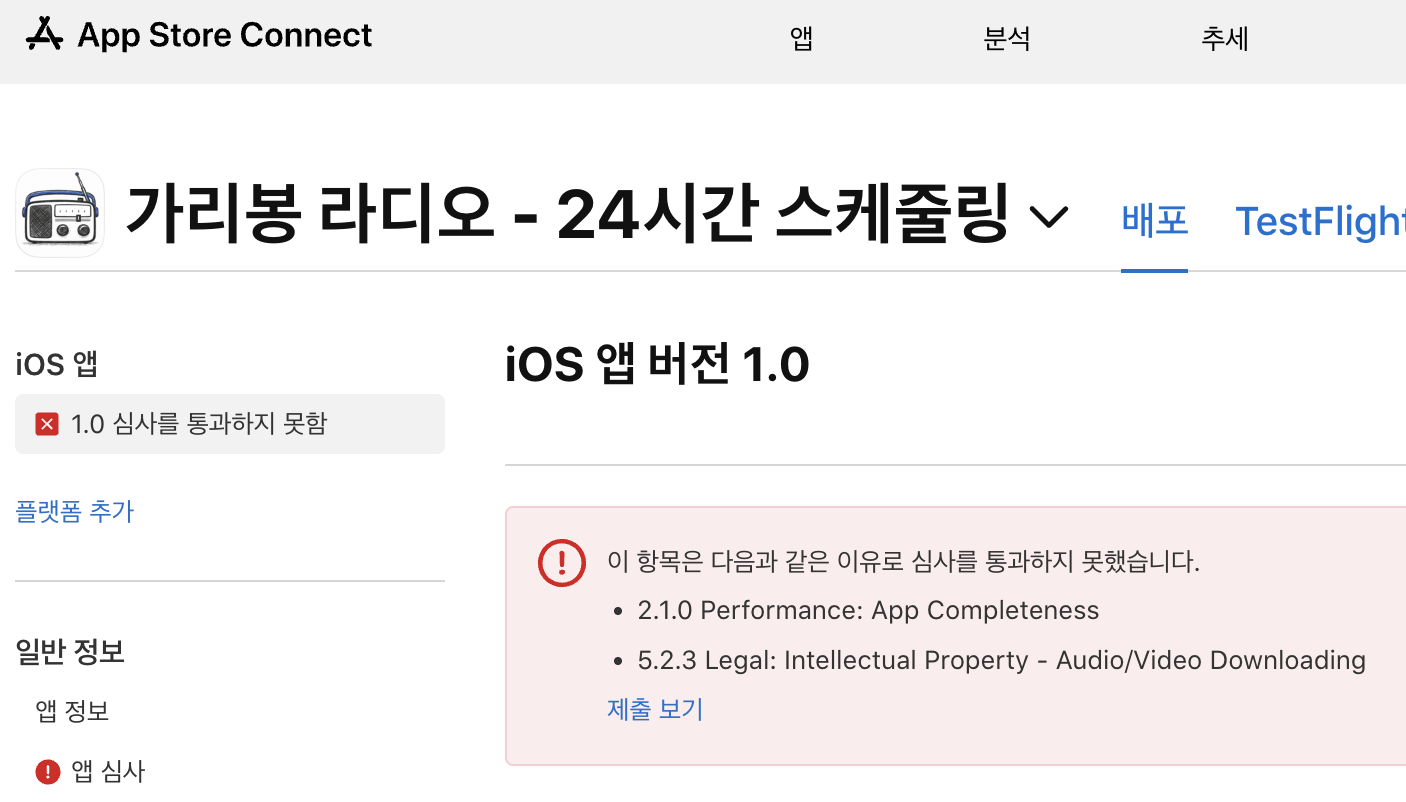
이 글을 보고 있는 다른 분들께 도움이 될 수도 있으니 전문을 아래 '더보기' 형태로 공유한다.
Hello,
Thank you for submitting the new app, 가리봉 라디오 - 24시간 스케줄링, for review. We noticed some issues that require your attention. Please see below for additional information.
If you have any questions, we are here to help. Reply to this message in App Store Connect and let us know.
Review Environment
Submission ID: 254a7642-0a7b-40f9-908a-04a2ffb283eb
Review date: January 06, 2026
Review Device: iPad Air 11-inch (M3)
Version reviewed: 1.0
Guideline 5.2.3 - Legal
Your app contains content or features that may violate the rights of one or more third parties. Specifically, your app provides potentially unauthorized access to third-party audio or video streaming, catalogs, and discovery services.
Your app and its contents should not infringe upon the rights of another party. In the event your app infringes another party’s rights, you are responsible for any liability to Apple because of a claim.
Next Steps
To resolve this issue, please attach documentary evidence in the App Review Information section in App Store Connect evidencing that you have all necessary rights or permissions to the third-party audio or video streaming, catalogs, and discovery services in your app.
Once we have reviewed your documentation and confirmed its validity, we will proceed with the review of your app.
Resources
- Review Guideline 5.2 Intellectual Property for more information about appropriate uses of third-party content and services on the App Store
- Review App Store Connect Help for more information on including notes in the App Review Information section of App Store Connect
Guideline 2.1 - Performance - App Completeness
Issue Description
The app exhibited one or more bugs that would negatively impact users.
Bug description:
- The app did not play any audio and content when tapped on the play button.
Review device details:
- Device type: iPad Air 11-inch (M3)
- OS version: iPadOS 26.2
Next Steps
Test the app on supported devices to identify and resolve bugs and stability issues before submitting for review.
If the bug cannot be reproduced, try the following:
- For new apps, uninstall all previous versions of the app from a device, then install and follow the steps to reproduce.
- For app updates, install the new version as an update to the previous version, then follow the steps to reproduce.
Resources
- For information about testing apps and preparing them for review, see Testing a Release Build.
- To learn about troubleshooting networking issues, see Networking Overview.
Support
- Reply to this message in your preferred language if you need assistance. If you need additional support, use the Contact Us module.
- Consult with fellow developers and Apple engineers on the Apple Developer Forums.
- Provide feedback on this message and your review experience by completing a short survey.
리젝 사유가 하나가 아니고 무려 두 가지다.
리젝 사유 #1: Guideline 5.2.3 - Legal
앱이 제공하는 컨텐츠가 third-party의 저작권을 침해할 수 있다는 것이다. 앱이 서비스된 뒤에 이 부분이 문제가 될 수도 있을 거라 생각하긴 했다. 하지만 third-party 쪽에서 문제를 제기하는 경우만 생각했지, 앱 스토어 심사 단계에서 문제가 될 줄은 미처 몰랐다. 저작권에 문제가 없는 컨텐츠로 교체하는 방향으로 앱을 대폭 수정해서 대응하려고 한다.
리젝 사유 #2: Guideline 2.1 - Performance - App Completeness
앱의 버그로 인한 리젝이다. 재생 버튼을 터치해도 아무 소리도 나지 않는다고 기재돼 있다. 이건 좀 의외였다. 여러 번 테스트했지만 동작 자체가 안 된 적은 없었다. 리젝 사유 문구를 그대로 긁어서 프로젝트 코드를 알고 있는 Claude에게 물어봤다.
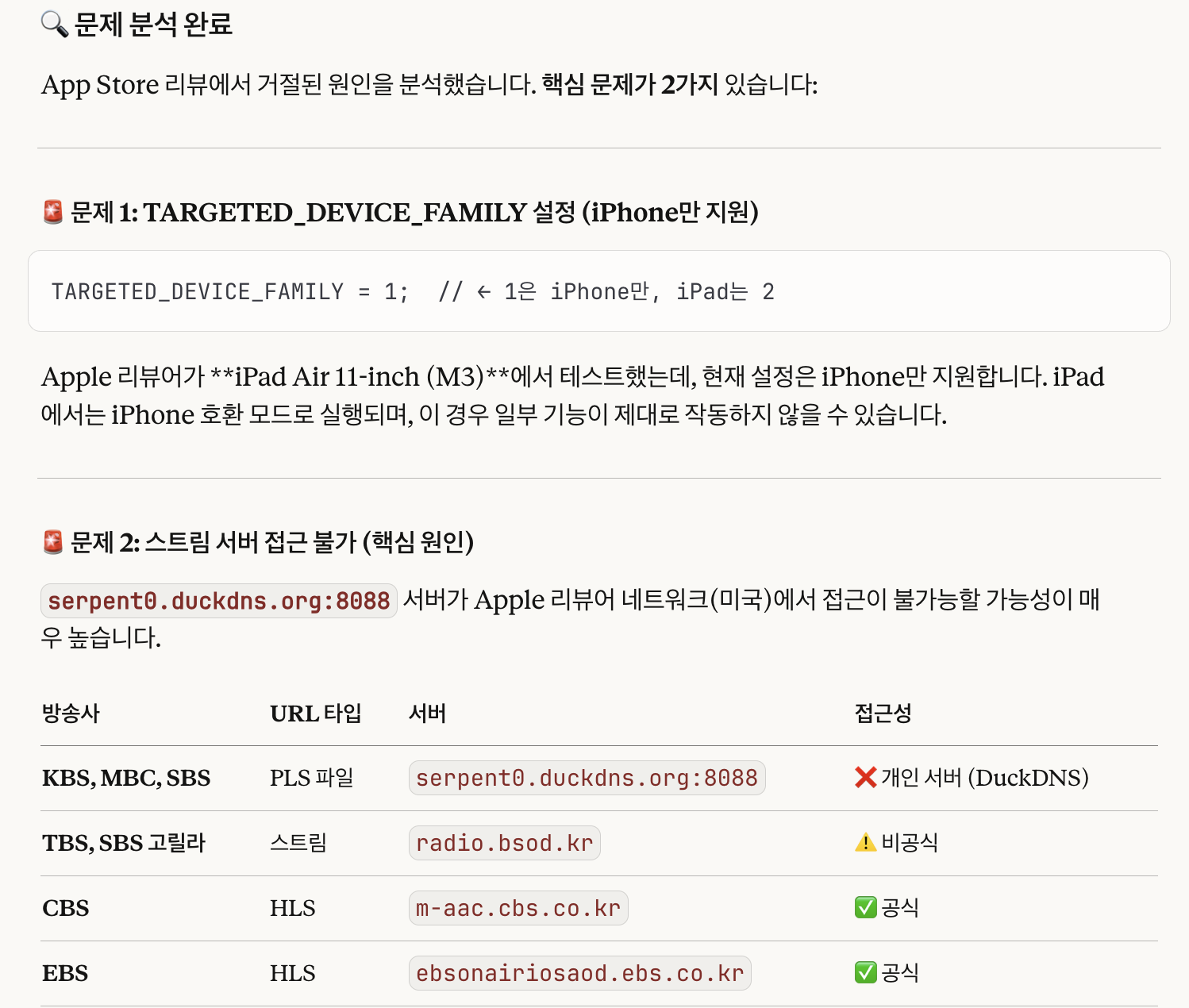
두 가지 원인을 제시했는데 첫 번째는 리뷰어가 아이폰이 아닌 아이패드에서 테스트를 한 것이 원인이라 것인데 잘못짚은 듯하다. 화면이 아닌 사운드 이슈인데 아이패드에서만 문제가 발생할 이유가 없다. 에뮬레이터를 iPad로 선택해서 테스트해 봤는데 정상적으로 소리가 재생된다. 두 번째 원인은 일리가 있어 보였다. 리뷰어가 미국에 있을 가능성이 크고, 그렇다면 아예 스트리밍 서버에 해외로부터의 접근이 차단돼 있거나 그렇지 않더라도 딜레이가 클 수 있다.
VPN을 이용해서 이슈 재현 성공, 대응 방안 수립하기
The best VPN for speed and security
Get fast, secure VPN service in {variable_totalVpnCountries}+ countries. Download our free VPN now — or check out Proton VPN Plus for even more premium features.
protonvpn.com
테스트 기기(내 소듕한 아이폰14 프로 맥스)에 VPN 앱을 설치했다. 무료 앱을 몇 개 설치해 봤는데 국가 선택이 안 되거나 제대로 동작하지 않았다. 회사 다닐 때는 NordVPN이란 놈을 회사에서 사줬는데 내 돈으로 사서 쓰려니 살짝 망설여지는 금액이다. 큰 차이는 없지만 조금 저렴한 ProtonVPN으로 한 달 구독을 질렀다.


ProtonVPN 앱(광고 아님, 내돈내산..)을 실행하고, 지역을 미국으로 선택하고 VPN을 활성화시켰다. '가리봉 라디오' 앱을 실행하고, 심사 결과에 첨부된 이미지와 동일하게 "KBS HappyFM"을 선택했다. UI는 재생 생태로 변경됐는데 정말 아무 소리도 들리지 않았다. 그런데 대략 7~8초 정도 후에 소리가 나기 시작했다. 아예 소리가 나지 않는 것이 아니라 딜레이가 심한 것이었다. 위에서 Claude가 지적한 대로 duckdns.org 서버를 사용하는 컨텐츠들이 유독 딜레이가 심했다. 역시 Claude 답변 대로 방송사 공식 서버나 radio.bsod.kr 서버를 사용하는 컨텐츠들은 딜레이가 별로 없었다.
웹라디오 서비스(radio.bsod.kr) 개발 노트
우리나라의 인터넷 라디오 청취 환경은 방송사별로 심하게 파편화되어 있는 경향이 강하다. 'TuneIn'과 같은 하나의 통합된 포털 안에서 원하는 방송사의 채널을 검색해 들을 수 있는 것이 아니라
blog.bsod.kr
이번에 심사를 넣은 1.0 버전은 일단 빠르게 구현하려고 스트리밍 url을 구글링으로 얻어 와서 그대로 쓴 탓에 뒤죽박죽이다. 추후 업데이트 시 정리하려고 했는데 이번에 바로 잡고 가야겠다. 또한 radio.bsod.kr 서버도 개인이 Cloudflare Workers 기반으로 서버리스로 구현했다는 것을 확인했다. 따라서 이 서버를 바로 사용할 것이 아니라 따로 구현하는 것이 장기적으로 좋을 듯하다.
추가 대응: 에러 상태 및 모니터링 추가
추가로 Claude가 제안한 수정 제안이다. 아래는 스트리밍 주소를 불러오는 프로젝트 코드인데 로딩에 실패해도 아무런 피드백이 없다.
// RadioPlayer.swift - loadPLSAndPlay
} catch {
    print("Failed to load PLS: \(error)")  // 콘솔 출력만
    await MainActor.run {
        isLoading = false  // 에러 표시 없이 종료
    }
}
로직에 에러 핸들링을 추가하고 UI에도 에러 상태를 표시하도록 수정할 예정이다. 얼른 작업해서 다시 심사를 넣어야겠다. 끝.
'개발 일지 > iOS앱 가리봉라디오' 카테고리의 다른 글
| 가리봉라디오(iOS) - 드디어 심사 통과, 앱 버전 1.0 릴리즈 (1) | 2026.01.12 |
|---|---|
| 가리봉라디오(iOS) - v1.0(4) 빌드도 반려, 리뷰 담당자에게 문의 넣고 대기 중 (0) | 2026.01.09 |
| 가리봉라디오(iOS) - 또 저작권 이슈로 반려, 1.0(4) 빌드 및 재심사 등록 (0) | 2026.01.08 |
| 가리봉라디오(iOS) - 1.0(3) 빌드로 재심사 등록, 저작권 이슈 있는 컨텐츠 제거 (0) | 2026.01.07 |
| (Claude를 이용한) 간단한 iOS 앱 제작기 - 가리봉 라디오 (0) | 2026.01.01 |


